
Cribl's app framework removes the hosting, auth, and API tax. But AI still codes blind to your instance. Here's how a CLI closed that gap.
I used to dread building dashboards, but with Cribl's app framework it's actually pretty fun now. It's a genuinely new way to stand up real dashboards without becoming a frontend developer first. This is the story of what I built, why the platform made it possible at all, and the one change that took it from "neat" to "I'd put this in front of a customer": making the AI aware of my actual environment with a CLI I wrote.
Who I am and why this matters
Four years in professional services, mostly Cribl and other log-analytics implementations. Before that I was deep in the Splunk ecosystem like a lot of people in this space: high-touch implementations, platform migrations, REST collectors. I've spent a lot of time unwrapping open-source apps and add-ons, tracking down Python files, and figuring out how to make them Cribl-native.
Writing frontend code / KQL is not something I do every day. I'm a data person. I care about pipelines and schemas and whether the right logs are landing in the right places. So when I say I built dashboards, understand that a year ago that meant days of work, boxed in by whatever the built-in panels could do. Cribl's new app framework changes the equation entirely: apps are real React applications under the hood, so the ceiling goes from "arrange some panels" to full custom interfaces with their own components and interactions, and the build time drops from days to hours.
Around Christmas 2025 I started using Claude Code seriously, and the models felt different. I found myself upskilling in all sorts of areas, tinkering on projects that would have been unachievable a year earlier. The output was no longer "slop." The models were producing genuinely good results. So when Cribl shipped Apps, I dove in head first into this new frontier of agentic engineering.
The operational gap I needed to close
During Professional Services engagements I'll often find myself monitoring the Cribl environment. Are the worker nodes healthy? Why did that pipeline drop traffic? What do the internal logs actually say? The answers exist, but getting to them takes some pivoting: bouncing between views, manually correlating data, rebuilding context that should just live somewhere.
What I wanted was a Route Health Check: show me routes that were reporting data in the last 24 hours but have gone silent for at least two hours. That's the difference between "everything's fine" and "a source died at 2am and nobody noticed until the morning stand up." Simple to describe, exactly the kind of institutional-knowledge signal that usually lives in my head instead of on a screen.
What Cribl's app framework takes off your plate
I described what I wanted and the AI wrote the code. That part went about how you'd expect. What surprised me was everything the platform simply handled:
No hosting to figure out. The app lives inside Cribl as a sandboxed experience. Nothing to provision, nothing to babysit.
No login page to build. Auth flows through the platform automatically, scoped to whoever's using it. I never thought about session management once.
No API wiring. When the app queries Cribl's data, the platform handles routing. I write a fetch call like it's local and it works.
Live Preview. Make a change, see it immediately. For someone used to slow infrastructure feedback loops, that iteration speed genuinely changed how I moved.
If I'd tried to build this outside the platform, the idea would have died fast. Frontend help, hosting, auth, API plumbing, six months of infrastructure work before doing anything useful for the business. The app framework that Cribl created deletes all of that. It's a genuinely great foundation, and I want to be clear about that before I get to the one catch.
The catch: why AI coding blind to your environment always fails
So the Cribl app framework is a fantastic way to build. There's exactly one thing it can't do for you, and it's worth being honest about up front: the AI writing your code doesn't know your environment. Out of the box it's coding blind to your actual Cribl instance. It doesn't know which metrics endpoints your version exposes, what your worker groups are called, which routes exist, or what the data coming back actually looks like. It knows how to write a dashboard. It doesn't yet know your dashboard.
My first attempt was exactly the naive one. Same model I use for everything, Claude Opus 4.8 on high, one clean prompt:
Prompt: Cribl Apps only
The app built. It looked right. And then the dashboard threw:
Every counter read 0 stalled, 0 active, 0 idle. It guessed at a metrics endpoint that doesn't exist on my deployment, and with no way to check its own work, it had no idea it was wrong. That's not the model being dumb. It's the model being uninformed. It never had a picture of the environment it was building against.
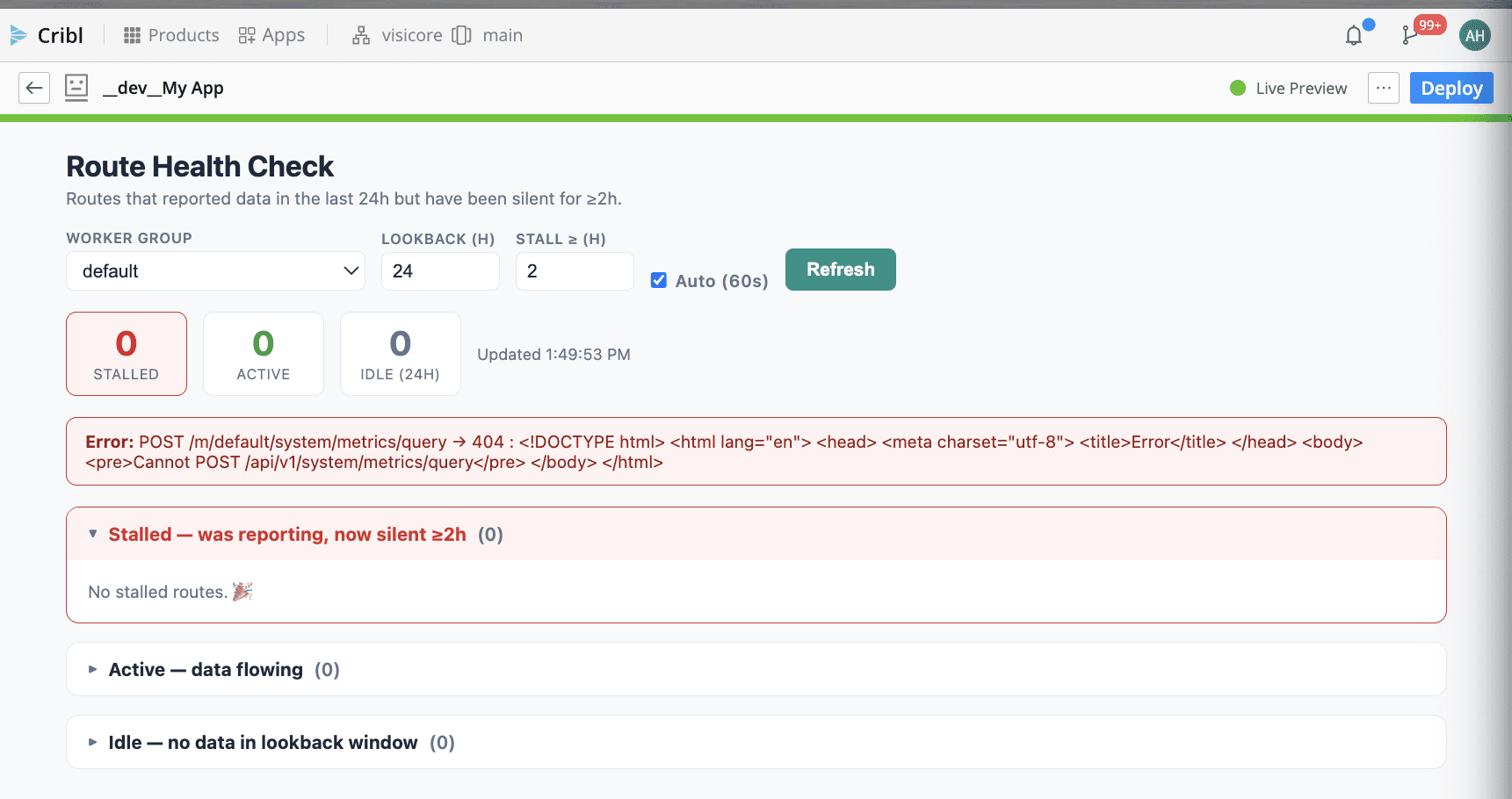
BEFORE — Apps + Opus 4.8, no environment context. The app renders, but the metrics call 404s and every route bucket is empty.
The fix: how a CLI gives the AI real environment awareness
Pasting a script into the app and hoping the model figures out the rest never worked well for me. So I built the thing I kept wishing existed: vct-cribl-cli, a command-line interface for the Cribl Cloud REST API. It wraps 70-plus resources (pipelines, routes, sources, destinations, Edge fleets, search, health, metrics, FinOps billing) behind commands like cribl routes list, cribl health report, cribl metrics, and cribl overview summary.
The point isn't that it's a nice CLI (though it is: 162 passing tests, profiles, table output, dry run mode). The point is what it does for an AI coding agent: it turns "guess what your environment looks like" into "go run a command and find out." It's a repo the agent can read and a set of commands the agent can actually execute to ground itself in reality.
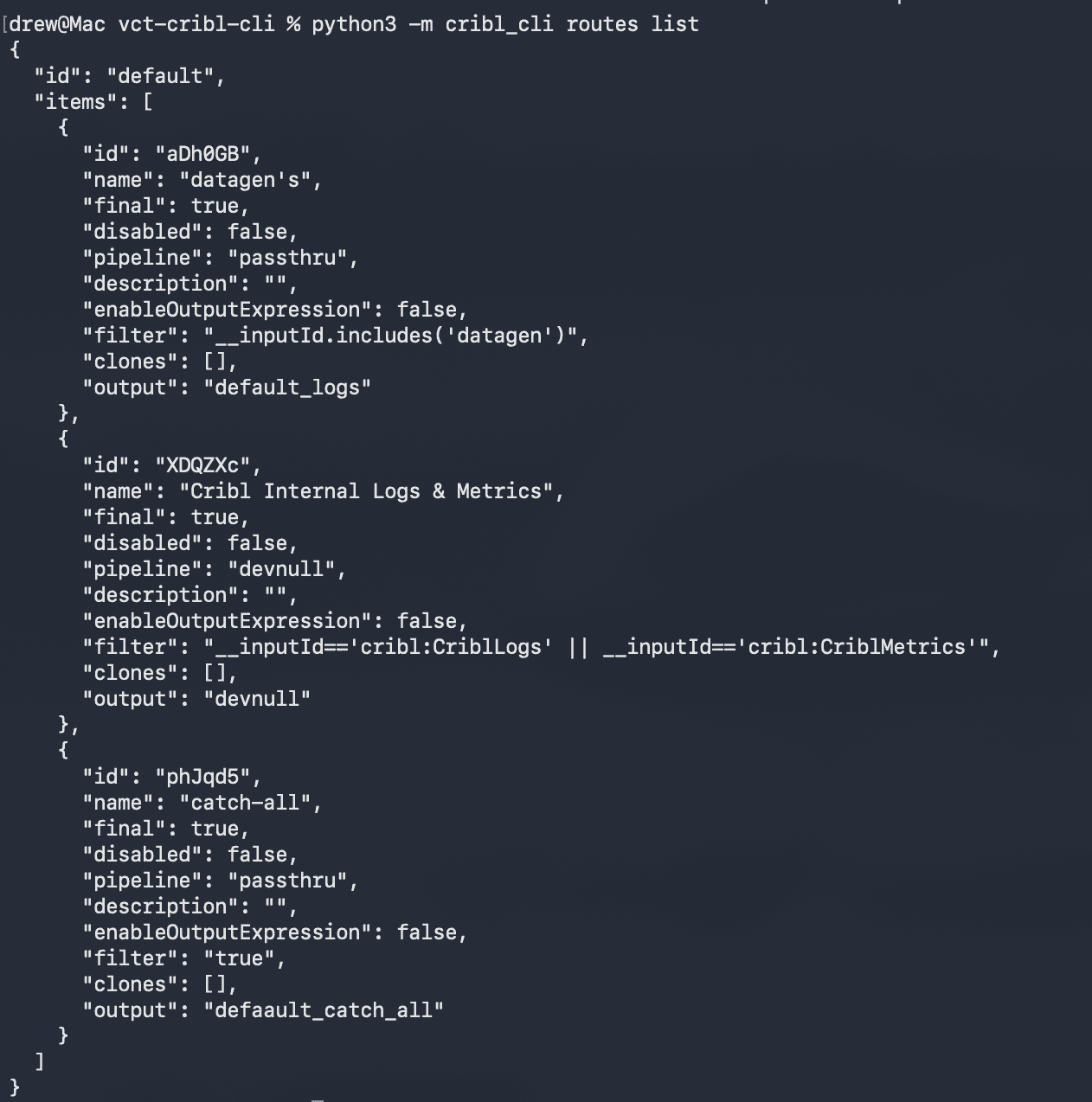
The agent doesn't have to guess. It can run cribl routes list, cribl health report, or cribl overview summary and read back the real environment before it writes a line of dashboard code.
Same model. Same day. The only thing that changed was one clause pointing the agent at the CLI:
Prompt: Cribl Apps + vct-cribl-cli
That one addition changed everything. Instead of guessing at an endpoint, the agent went and looked: it read the CLI, ran commands against my actual instance, saw the real metrics shape, the real route names, the real worker groups, and wrote the dashboard against that.
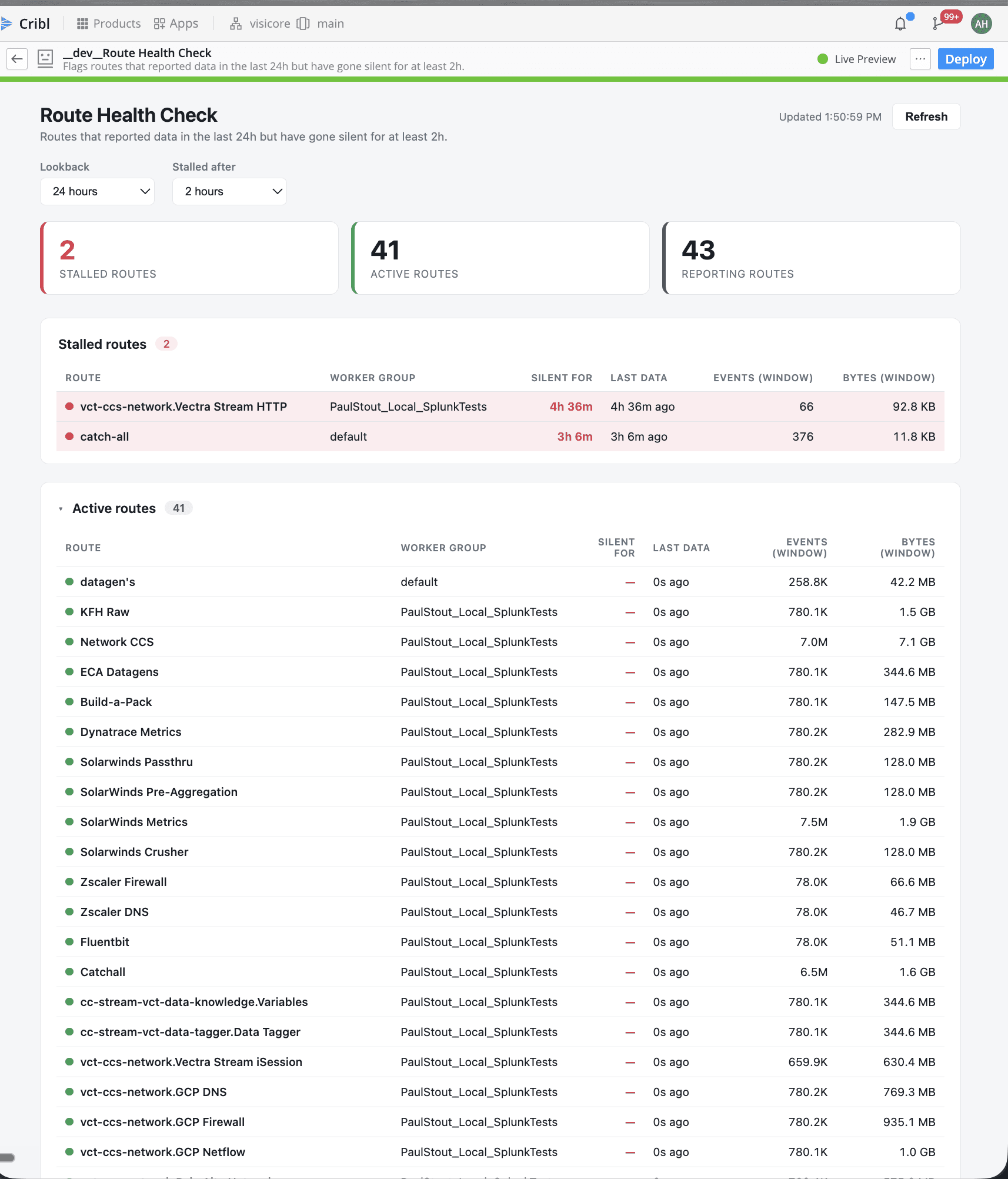
AFTER — Same model, same prompt, plus one line pointing at the CLI. Real numbers: 2 stalled routes (vct-ccs-network.Vectra Stream HTTP silent 4h 36m, catch-all silent 3h 6m), 41 active, 43 reporting, with worker groups, silent-for durations, and event/byte counts per route.
The difference isn't subtle. On the left, a working app rendering nothing because it can't talk to the environment. On the right, an operationally useful dashboard I'd actually put in front of a health-monitoring team, populated with real routes, real silence windows, real volume.
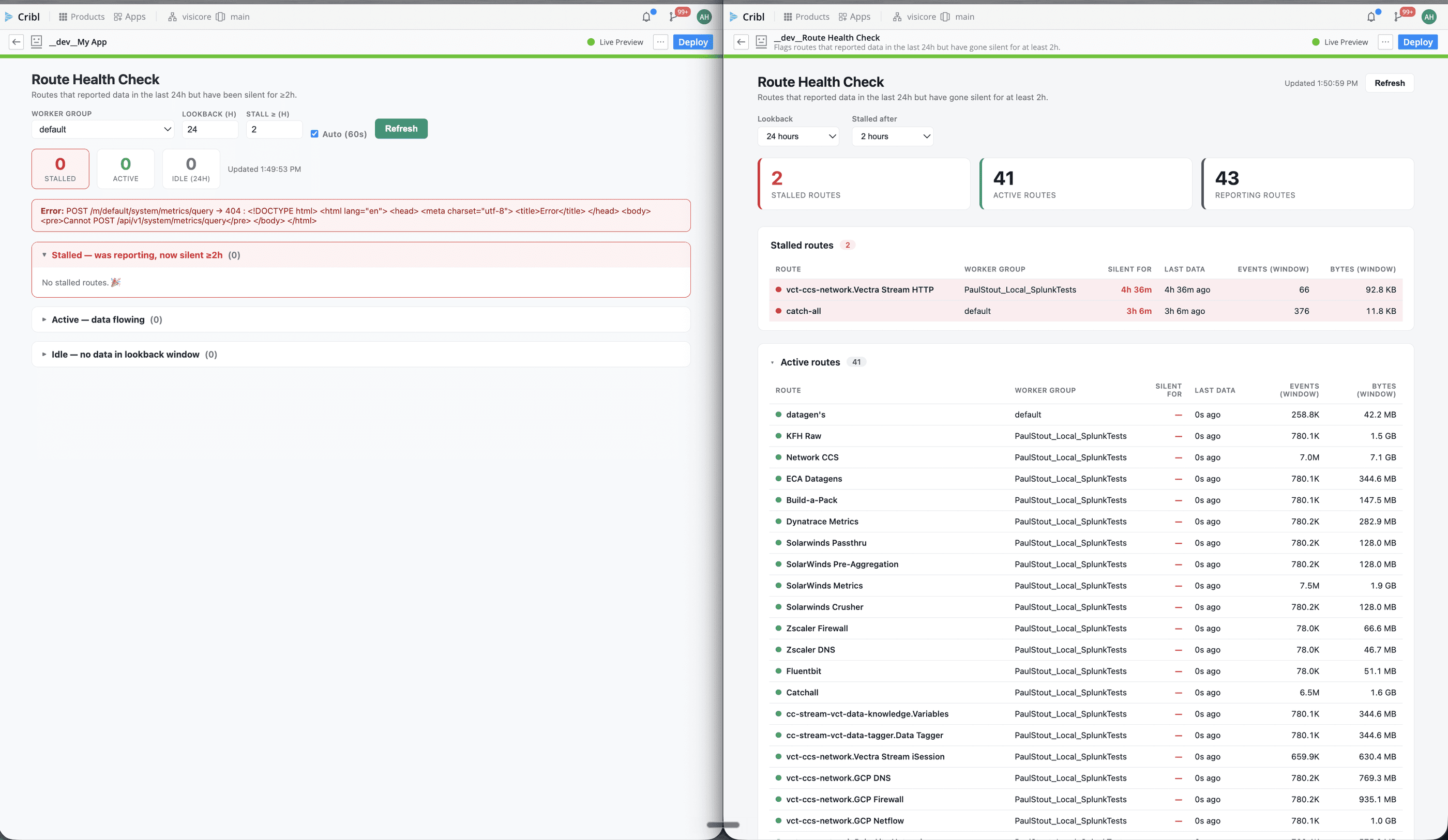
Same model, same setting, same day. The only difference between these two builds is one clause telling the AI where to find the environment.
Why this works: context beats cleverness
It's tempting to reach for a bigger model or a more elaborate prompt when the output is wrong. But both of those builds used the same model at the same setting. The variable that mattered was context awareness: whether the agent could observe the environment it was coding against or had to hallucinate it.
This maps to how these tools actually work. An agent is only as good as what it can inspect. Give it a filesystem and it reads your files. Give it a browser and it reads the web. Give it a CLI that speaks to your Cribl instance, and it can read your pipelines, your routes, your metrics, and check its own work before handing you something broken.
The takeaway: Cribl removes the frontend, hosting, auth, and API-plumbing tax so you can build. The CLI removes the knowledge tax: it lets the AI ground its code in your real environment instead of a plausible guess. The first gets you an app. The second gets you an app that's actually right.
Apps alone vs. Apps + a CLI
Frontend / hosting / auth — Apps only: handled by the platform. Apps + CLI: handled by the platform.
Knows your metrics endpoints — Apps only: ✗ guesses → 404. Apps + CLI: ✓ reads them from the API.
Knows your route & group names — Apps only: ✗ generic placeholders. Apps + CLI: ✓ real names, live.
Can verify its own output — Apps only: ✗ no feedback loop. Apps + CLI: ✓ runs commands, checks results.
Result on my instance — Apps only: 0 / 0 / 0 plus an error banner. Apps + CLI: 2 stalled, 41 active, 43 reporting.
Fair caveat: this might be partly user error, and that's kind of the point. Maybe a more careful prompt gets Apps there on its own. But "be a better prompter" doesn't scale across a team, and it doesn't survive the next Cribl version bumping an endpoint. Wiring in environment awareness does. The CLI makes being right the default instead of something you have to coax out.
Where I'm taking this
I had six apps going at various stages: worker-group status, node health, internal log messages, the signals you want visible before a 2am page turns into a three-hour incident bridge. I've since consolidated all of them into a single app: CriblVision, a real-time health monitoring app with dedicated panels for throughput, sources and destinations, route health, worker nodes, notifications, and data value. Think of it as a spiritual successor to the CriblVision Pack, rebuilt native to the Cribl app framework. It's light-years ahead of what I was building before: same data, completely different experience. Compliance is still the main thing keeping me from pushing it straight into client environments, so I'm building and testing in VisiCore's environment first. Once distribution gets easier and there's a place for partners to share apps, this becomes something the whole community benefits from.
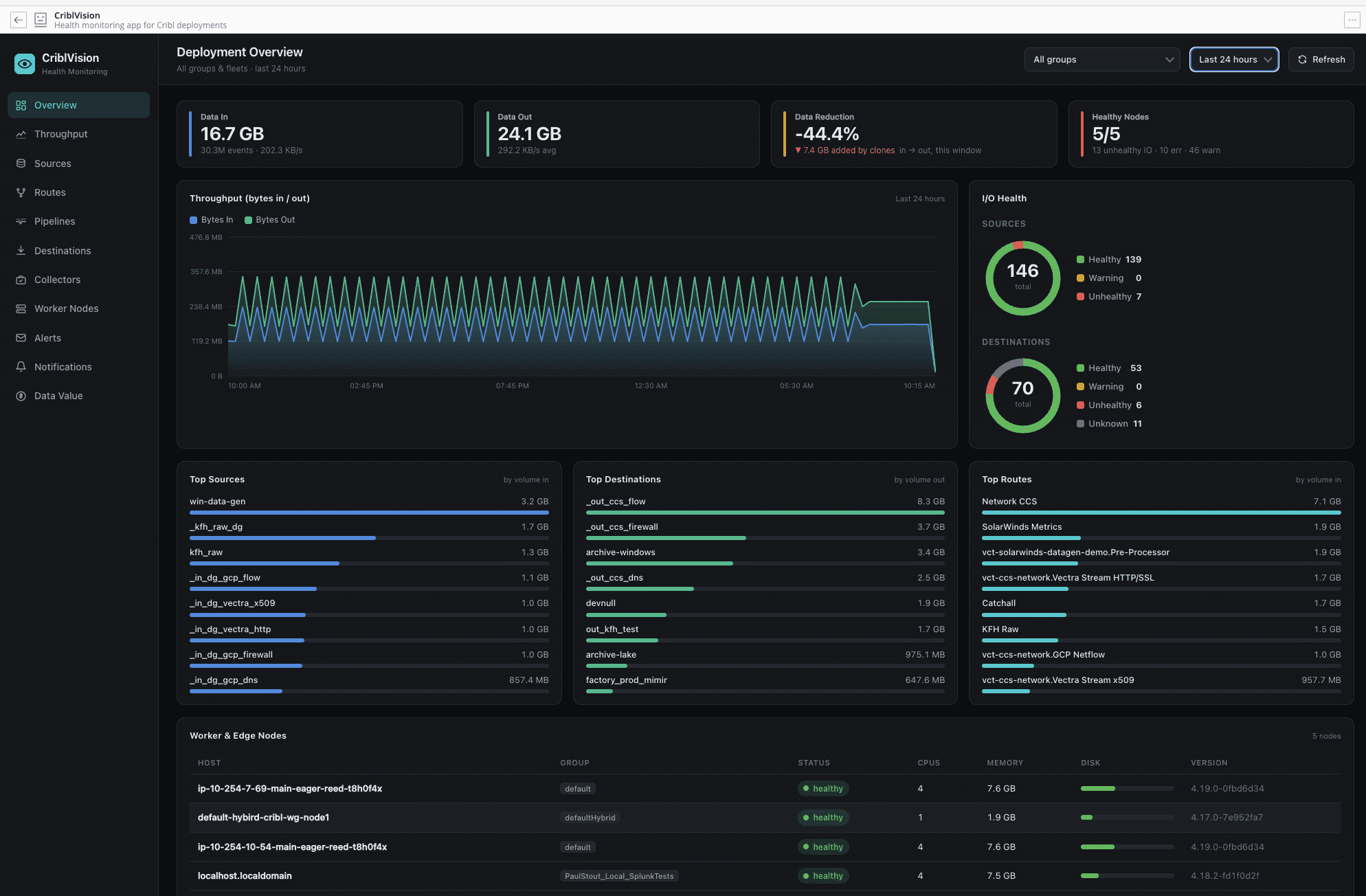
CriblVision Deployment Overview panel (shown here with demo data): KPI tiles for data in/out, reduction, and node health, live throughput, source/destination health, and top talkers, with the other seven panels a click away in the sidebar.
But the lesson I keep coming back to is smaller and more portable than any one dashboard: anything with AI context is king. Apps on the Cribl Platform gave me a foundation I couldn't have built alone. Giving the AI real awareness of my environment, through a CLI it can read and run, is what turned that foundation into something I trust. If you're building on the platform and the output feels almost right but hollow, don't reach for a bigger model. Reach for a way to let the model see your environment. Start there.
See VisiCore's Apps on Cribl-Community Repo Here
Andrew Hendrix is a Professional Services Consultant at VisiCore Technology Group. The CLI is open source (MIT) at github.com/VisiCore/vct-cribl-cli. Find him on LinkedIn.
Cribl Data Maturity Journey: Unlocking the Full Potential of Your Data| Read now

